GCLID (Google Click Identifier) is a URL parameter that Google Ads adds to each ad click when auto-tagging is on. It ties the click to its campaign, so Google Ads can record conversions and Google Analytics can show the visit as Google Ads traffic, with no manual tagging.
GCLID (Google Click Identifier) is a URL parameter that Google Ads adds to each ad click when auto-tagging is on. It ties the click to its campaign, so Google Ads can record conversions and Google Analytics can show the visit as Google Ads traffic, with no manual tagging.
What is gclid used for?
Matching an ad click to what happens next. Google’s GCLID definition says it’s required for Google Ads website conversion tracking, links Google Ads with Google Analytics, and powers offline conversion tracking.
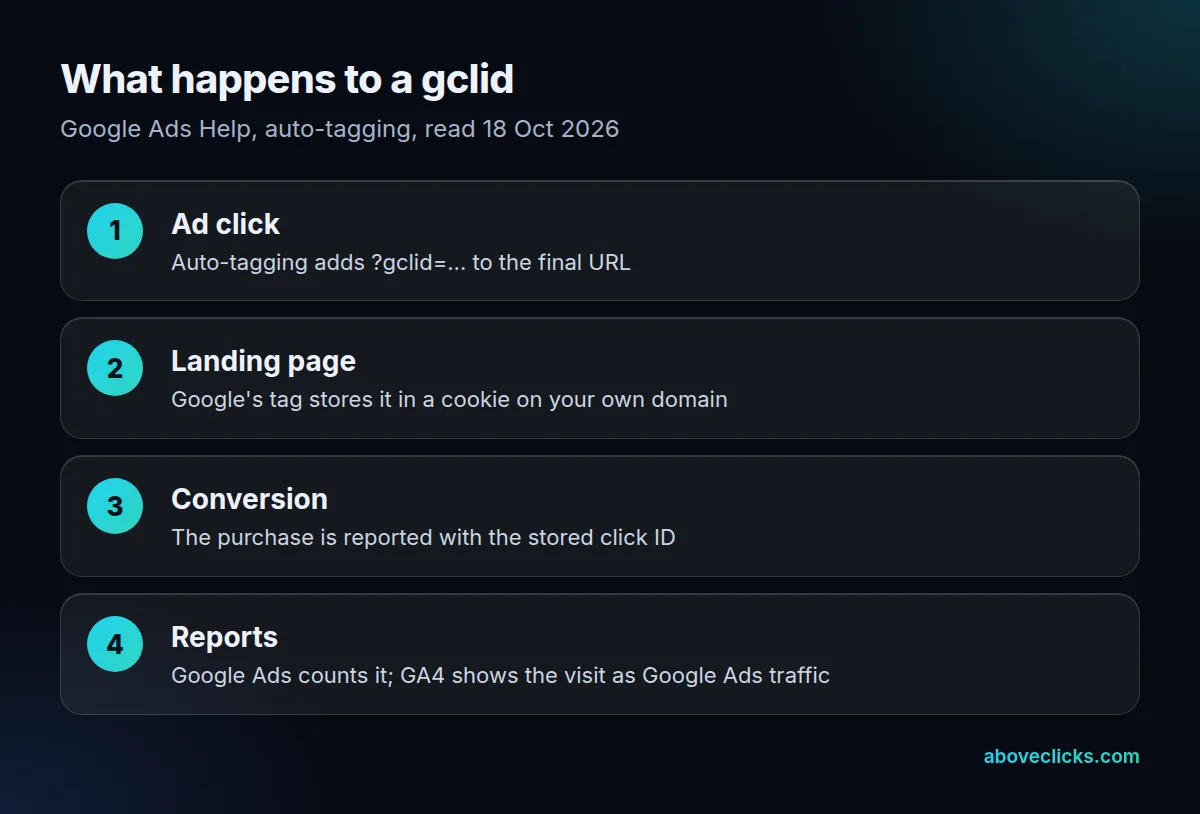
A clicked ad for www.example.com lands on a URL like www.example.com/?gclid=123xyz, Google’s own example on its auto-tagging page. Google’s tag then stores the value in a cookie on your own domain, so a purchase 3 days later can still be matched to that click. Auto-tagging is on by default for new Google Ads accounts. Google also notes the ID is sometimes created at the impression rather than the click, so 2 clicks on the same ad by the same person can share 1 gclid.
What is the difference between gclid and UTM tags?
The gclid is added automatically and only Google can read it; UTM tags are typed by hand and work for any platform. For Google Ads traffic in GA4, the gclid wins.
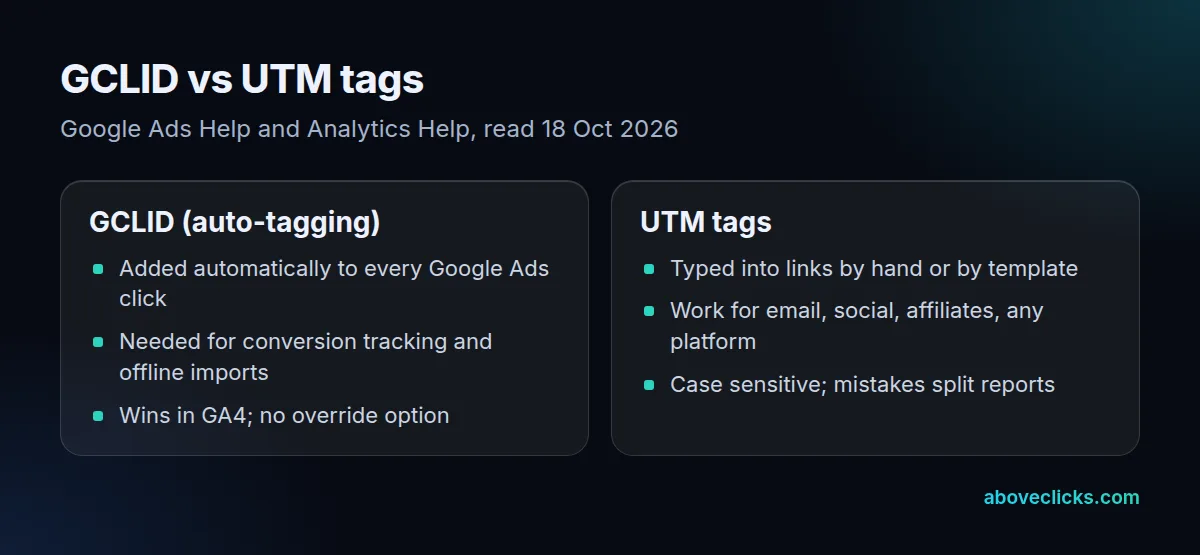
Google’s wording: “in Google Analytics 4 (GA4), auto-tagging is prioritized over manual tagging due to the absence of an override option.” So adding UTM parameters to Google Ads links doesn’t change how GA4 labels those visits while auto-tagging works; it only helps in the cases where the click ID can’t be used. For email, social and affiliate links, UTM tags remain the only option, and Google’s URL builder guide covers how to write them.
Example: a hypothetical store runs a Google Ads campaign whose links also carry utm_source=google and utm_campaign=spring. Of 1,000 ad clicks that arrive with a click ID, GA4 labels all 1,000 from the auto-tagged data, whatever the UTM tags say. The tags only matter for the clicks where the ID can’t be used, for instance when ad_user_data consent is denied.
Do store landing pages keep the click ID?
Almost all of the ones we tested do. On 18 October 2026 we requested 30 store homepages with a fake test gclid; 27 answered, 21 of those redirected at least once, and 26 of 27 still had the gclid in the final URL, capitals intact.
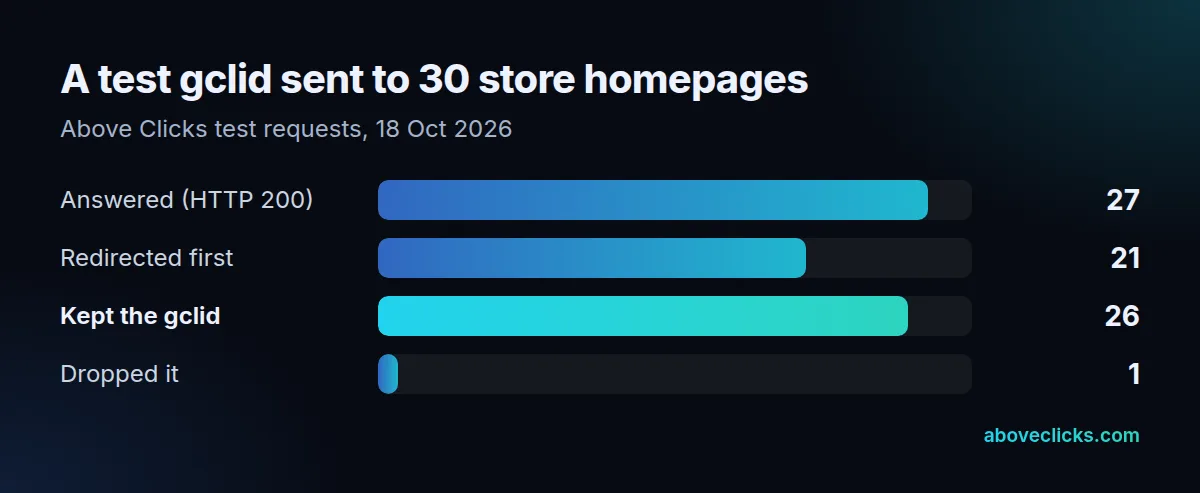
The exception was The Reformation. Its bare domain sends a 301 redirect to the www address and drops the query string, so an ad pointing at thereformation.com would arrive without its click ID, while one pointing at www.thereformation.com keeps it. Google warns about exactly this: redirects must pass the GCLID to the final landing page, and a small percentage of sites even serve an error when unknown URL parameters appear.
Checking your own setup
Click one of your own ads, or open your landing page with ?gclid=test123 added, and confirm the parameter survives to the final URL. Test every domain variant your ads use, with and without www, since that’s where our 1 failure happened. Then check the cookie: after landing, your browser’s developer tools should show a Google cookie on your own domain holding the value. If you use Google Tag Manager, add a Conversion Linker tag: 14 of the 17 real store containers we read on 18 October 2026 had one. Our GA4 audit runs these checks on every landing page your ads use, and the tracking and analytics hub covers the rest.