Agentic storefronts is Shopify's feature that lets shoppers discover and buy a store's products inside AI channels such as ChatGPT, Google AI Mode and Gemini, Microsoft Copilot and Meta. It's active by default for eligible stores and is managed under Sales channels > Agentic in the Shopify admin.
Agentic storefronts is Shopify’s feature that lets shoppers discover and buy a store’s products inside AI channels such as ChatGPT, Google AI Mode and Gemini, Microsoft Copilot and Meta. It’s active by default for eligible stores and is managed under Sales channels > Agentic in the Shopify admin.
How does the feature work?
Shopify sends your product data to each AI channel and reports the results back to you. Products reach the channels through Shopify Catalog, or for Google AI Mode and Gemini through the Google & YouTube channel or Merchant Center (Shopify Help Center).
- Default: the setting “Allow Shopify to manage for me” keeps every channel on and enrolls you in new agentic storefronts automatically.
- Terms: you must agree to the Shopify Agentic Storefronts Supplemental Terms of Service.
- Reporting: 4 reports per channel (sales, orders, online store sessions, online store conversion), shown for the last 30 days by default, and orders carry channel or referrer attribution.
Which AI channels are included?
As of October 2026, Shopify lists ChatGPT, Google AI Mode and Gemini, Microsoft Copilot and Meta, and its own Shop app works as a fifth agentic storefront (Managing agentic storefronts). Checkout differs between these Shopify AI channels.
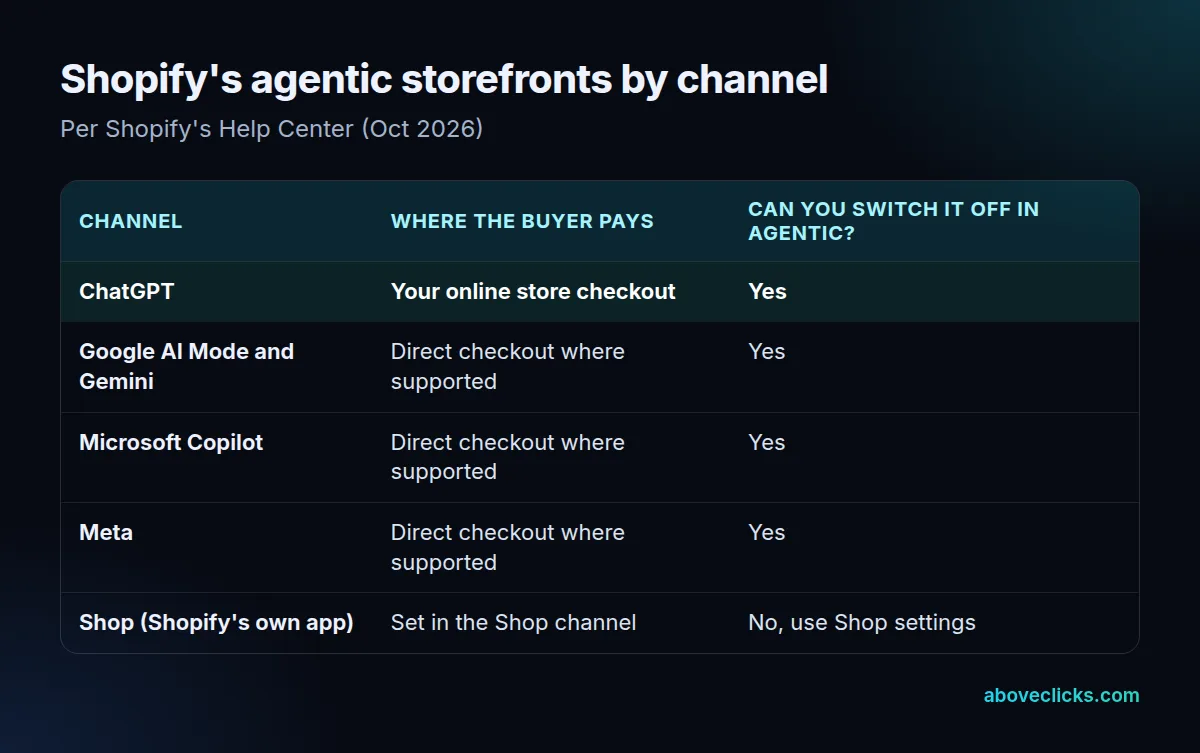
ChatGPT is a discovery channel: buyers “complete their purchase on your online store checkout in a ChatGPT in-app browser” (Selling on ChatGPT). The others can offer direct checkout in AI, where the purchase happens inside the conversation, and you can switch that off per channel. For Google AI Mode and Gemini, that checkout runs on the Universal Commerce Protocol, and all 18 Shopify stores in our 17 October 2026 check published its profile.
How do you turn off agentic storefronts?
Deactivate “Allow Shopify to manage for me” under Sales channels > Agentic, then switch off Shopify Catalog access for all third-party channels or for one at a time. As of October 2026, Shopify warns that it “can take up to 7 days” before your data stops being shared (Shopify Help Center).
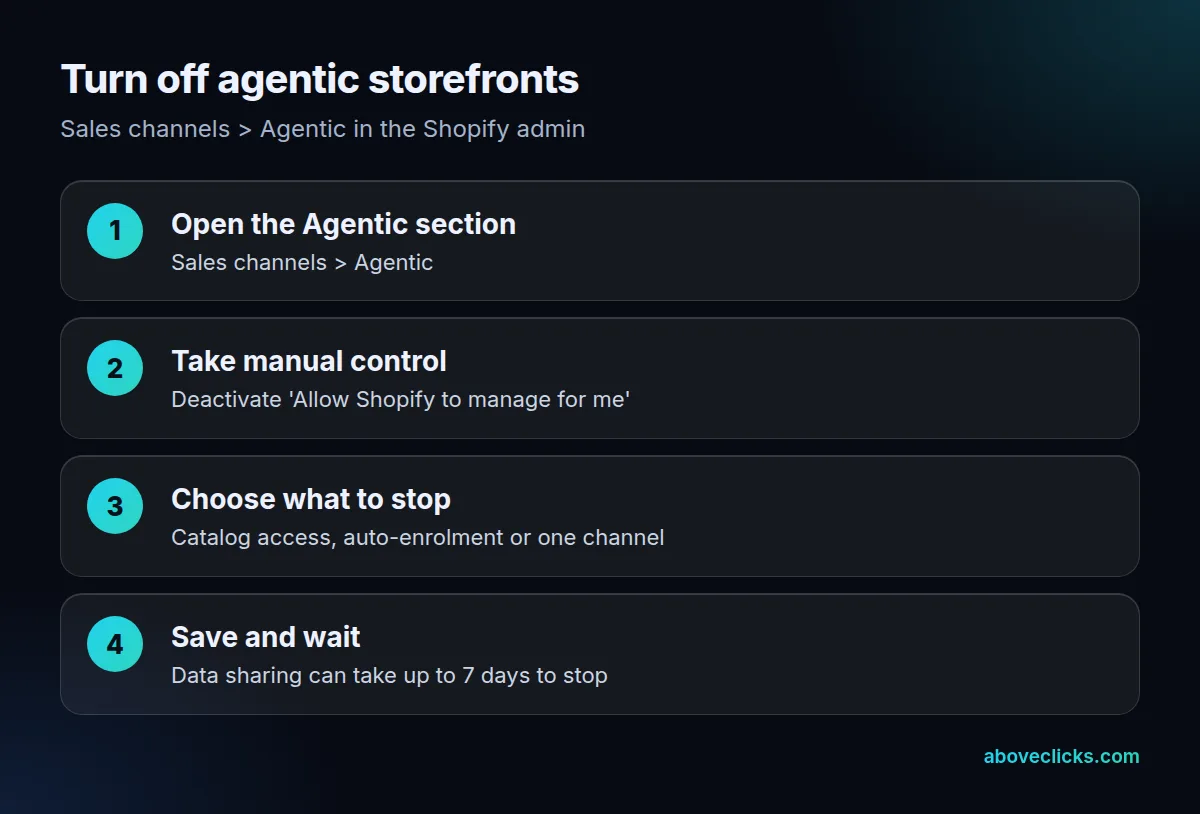
Two limits. Shop can’t be switched off in the Agentic section; you manage it in the Shop channel settings. And to hide a product from every agentic storefront, including Shop, Shopify points to Unlisted status or the seo.hidden metafield, which also hides it from search engines.
What do agentic storefronts show from real stores?
The same setup everywhere, with very different product data behind it. All 18 Shopify stores whose UCP profile we fetched on 17 October 2026 published an identical, platform-generated capability list, so the feature itself doesn’t separate one store from another.
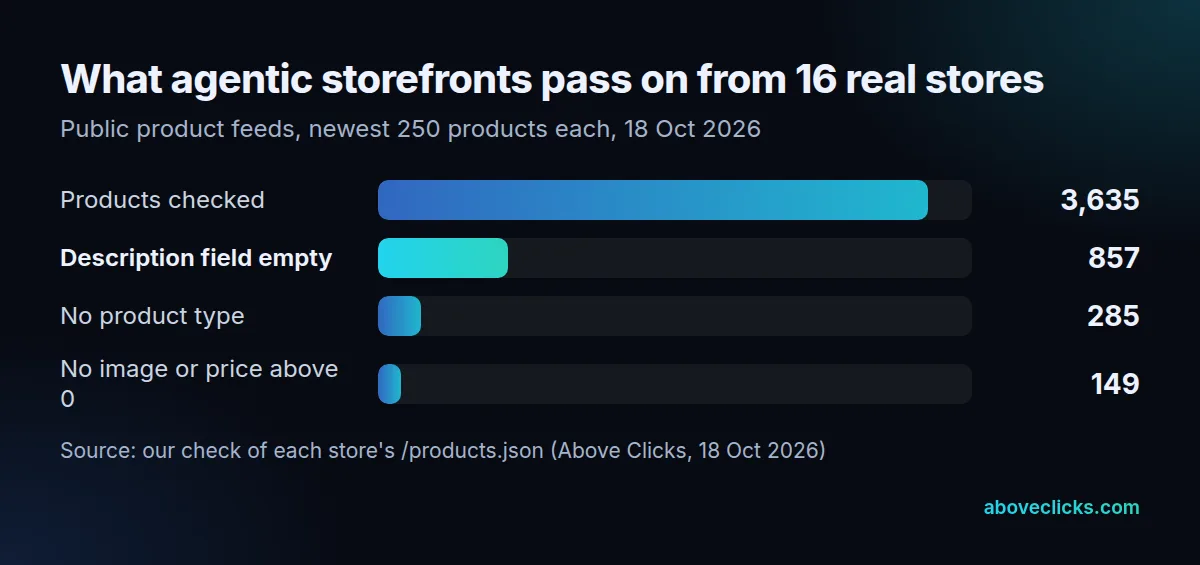
The data does. In the public feeds of 16 of those stores, 857 of 3,635 products had an empty description field and 285 had no product type, and that’s what agentic storefronts hand to AI channels unless the store fills it from metafields. We can’t see any store’s admin settings from outside, so this doesn’t show who has switched channels off. Our AI shopping channels service sets up the controls, the AI commerce readiness check fixes the data gaps first, and the AI for e-commerce hub covers the rest.