Affordable WordPress SEO packages are low-cost monthly plans for a WordPress site. Pay only for the work WordPress does not already do for you, such as useful page content, redirects, links and speed fixes.
This guide shows 6 checks you can run before you pay, what a low-cost package should include, and how to compare quotes line by line so that you do not pay twice for work WordPress does for free.
What are affordable WordPress SEO packages?
Fixed-scope monthly plans that improve how a WordPress site appears in search, priced for small budgets. Affordable WordPress SEO packages differ from full-service plans mainly in scope. The word affordable should describe a short, counted list of work, not a cheap version of everything.
Most WordPress SEO packages bundle 4 kinds of work: technical fixes, page content, links and reporting. A WordPress site adds a fifth item, the settings and plugins that control titles and descriptions. Judge affordable WordPress SEO packages after 3 to 6 months of work, not after 1 report, because pages take time to be found. The first step in judging a package is to separate what the site already does from what the provider will do. If you want the general tiers first, our guide to SEO packages for small business explains them, and the guide on how to buy an SEO package covers terms. This guide covers only what is specific to WordPress.
Is WordPress good for SEO out of the box?
It gives you a sound base for WordPress SEO, not a ranking. WordPress handles sitemaps and a search visibility setting for you, but page content, links and speed still need work.
The base has improved over time. WordPress 5.5, released in 2020, added a core sitemap, and WordPress 5.3 changed how the visibility setting works. Those changes mean 2 jobs that used to cost money now come with the software. What WordPress cannot do is write the page that answers a customer’s question, earn a link or make a heavy theme fast. That remaining work is what affordable WordPress SEO packages should be paid for.
A fair way to think about cost is as 3 bills: the hours of a person who knows the site, the tools that person needs and the hosting your site already pays for. Only the first bill belongs in a monthly package. If a quote bundles hosting or a plugin licence into the monthly fee, ask for it as a separate line so you can see what the SEO work itself costs. Our WordPress development service is a separate job from SEO, and a package should not blur the two.
What does WordPress already do for SEO?
It builds a sitemap, lets you hide the site from search with one setting and gives you editable URLs. Check these 6 items before you pay for them.
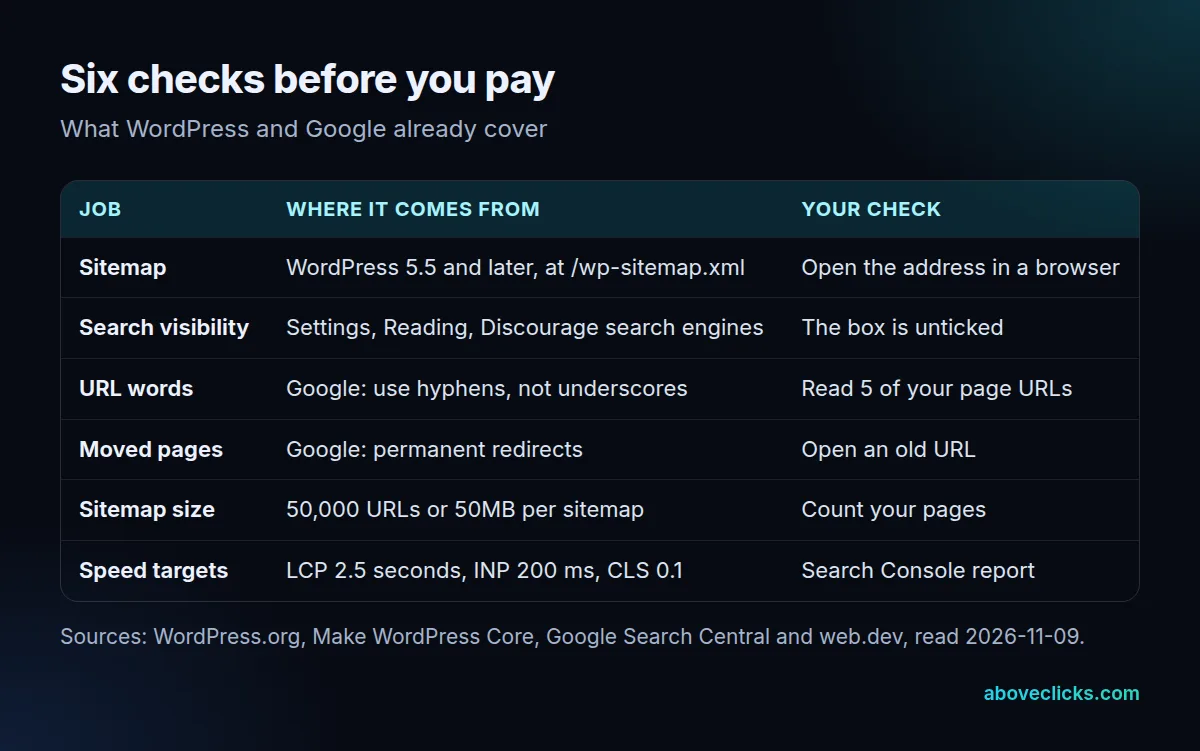
The first 2 rows need no skill to check:
- The sitemap. Make WordPress Core says that from version 5.5 a sitemap index is exposed at /wp-sitemap.xml, that a single sitemap holds a filterable maximum of 2000 entries, and that robots.txt references the index. Google’s sitemap guide says a single sitemap may hold 50,000 URLs or 50MB, so a small site never reaches either limit.
- The visibility box. The WordPress Reading screen documents a box called Discourage search engines from indexing this site. Since version 5.3, ticking it adds a noindex meta tag to the page head. A site left ticked after launch is the cheapest SEO problem to fix and the most costly to miss.
The other 4 are about your pages. Google’s URL structure guidance recommends hyphens rather than underscores between words. Google’s redirect guidance says a permanent redirect shows the new target in search results, while a temporary one shows the source page. Both are checks you can run in 10 minutes, so ask a provider to charge only for fixing what they find.
Moving a site is where WordPress SEO most often goes wrong. When a page’s address changes, for example when you change the permalink structure under Settings, every old address needs a permanent redirect to the new one. Skip that, and links from other sites and from Google’s results lead to error pages. A good WordPress SEO package lists the redirects it will set up, as a count, before the move. If a provider proposes changing your URLs, ask how many pages will move and how many will redirect, and check that the two numbers match.
Here is how to run the whole set in under 30 minutes, without any paid tool:
- Open yoursite.com/wp-sitemap.xml in a browser. If it loads a list of sitemaps, the core sitemap works.
- In the admin, open Settings, Reading and confirm the visibility box is unticked.
- Open Search Console, go to the pages report and note how many pages are indexed compared with how many you expect.
- Open 5 old addresses that have moved and confirm each lands on the right new page.
Write the results on 1 page and hand it to every provider you talk to. A quote that charges for something on that page is a quote to question, and a provider who reads your notes and builds on them is one worth hiring.
Do you need an SEO plugin for WordPress?
Often yes for titles and descriptions, but not for the sitemap or the visibility setting, which core WordPress already handles. A plugin is a tool, and the package should pay for what you do with it.
A plugin adds screens for page titles, descriptions and other markup. It does not write the page for you. Treat a plugin as one line in a quote, and ask which settings will be changed and why. If a package lists “install SEO plugin” as its main monthly deliverable, that is a setup task that takes about 1 hour, not a monthly service. The site stays yours either way, so keep the admin accounts in your own name. When you compare affordable WordPress SEO packages, the question to ask about any plugin is what it changes on your pages and who checks the change.
What should an affordable WordPress SEO package include?
A short, counted list of paid work, in an order that builds on itself, which is what the best affordable WordPress SEO packages offer: fixes first, then useful pages, then speed work where pages miss targets, then a monthly report.
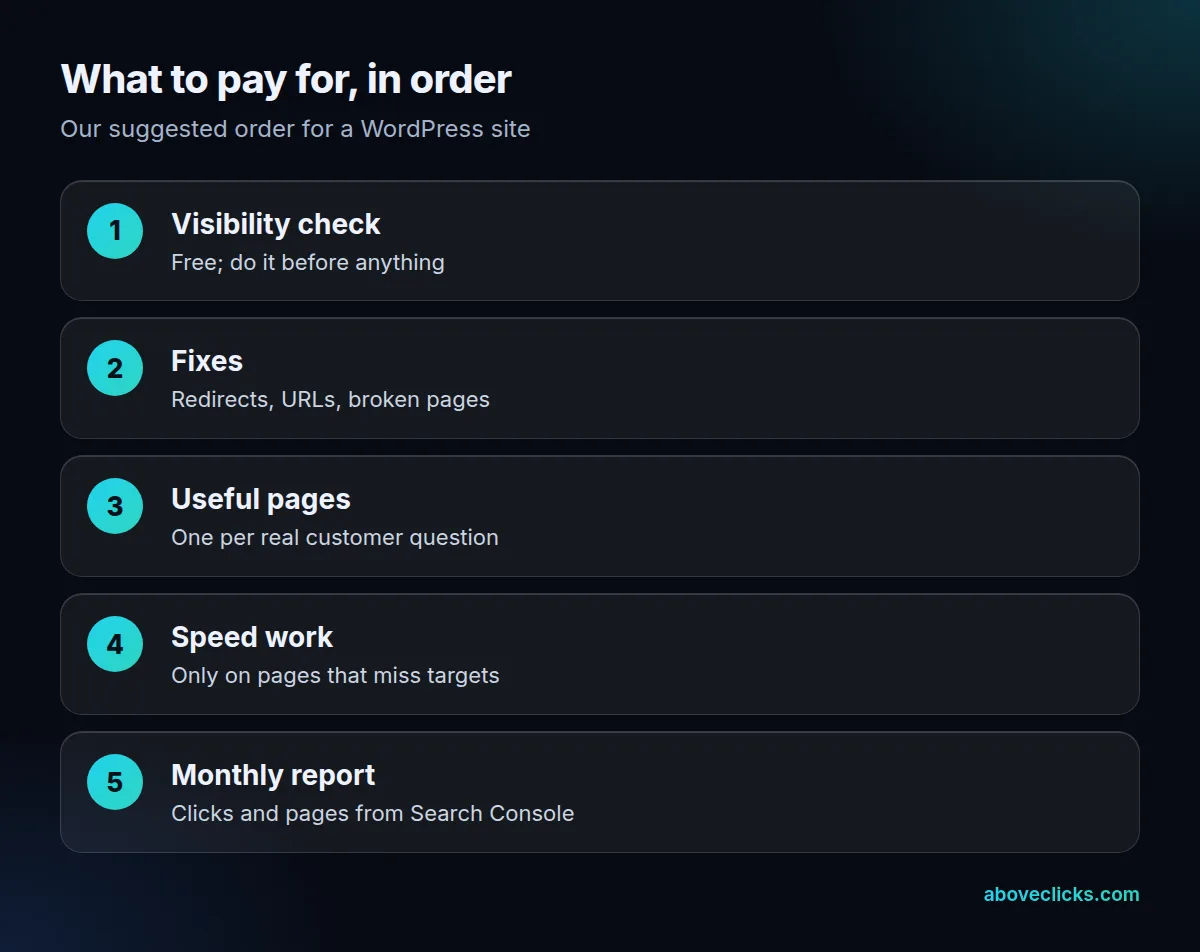
The order above is our own advice, not a rule from WordPress or Google. It follows dependency: pages written on a site that blocks search engines earn nothing, and speed work is wasted on pages nobody finds. Here is what each step means in practice:
- Visibility check: free, and done in the first hour.
- Fixes: redirects for moved pages, readable URLs and broken pages found in Search Console.
- Useful pages: one page for each real question a customer asks, written for that reader.
- Speed work: only on pages that miss Google’s targets.
- Monthly report: clicks and pages from Search Console.
Speed has clear targets. Web.dev’s Web Vitals guide sets Largest Contentful Paint within 2.5 seconds, Interaction to Next Paint at 200 milliseconds or less and Cumulative Layout Shift at 0.1 or less, measured at the 75th percentile of page loads. A WordPress package should name which pages miss those numbers before it charges for speed work. A site where 100% of pages already pass needs no speed line at all.
Content is the line that deserves most of the budget. One useful page for each question a customer asks beats 20 pages that repeat each other. Ask the provider to name the customer question behind each page, and to show how the page will answer it better than the pages that rank today. For WordPress SEO this also keeps the site small, which helps speed and keeps the sitemap short.
How do you compare WordPress SEO quotes?
Put every quote through the same 6 lines and mark what each one leaves out. Affordable WordPress SEO packages should survive that test. The cheapest quote is often the one with the most items missing, not the best value.
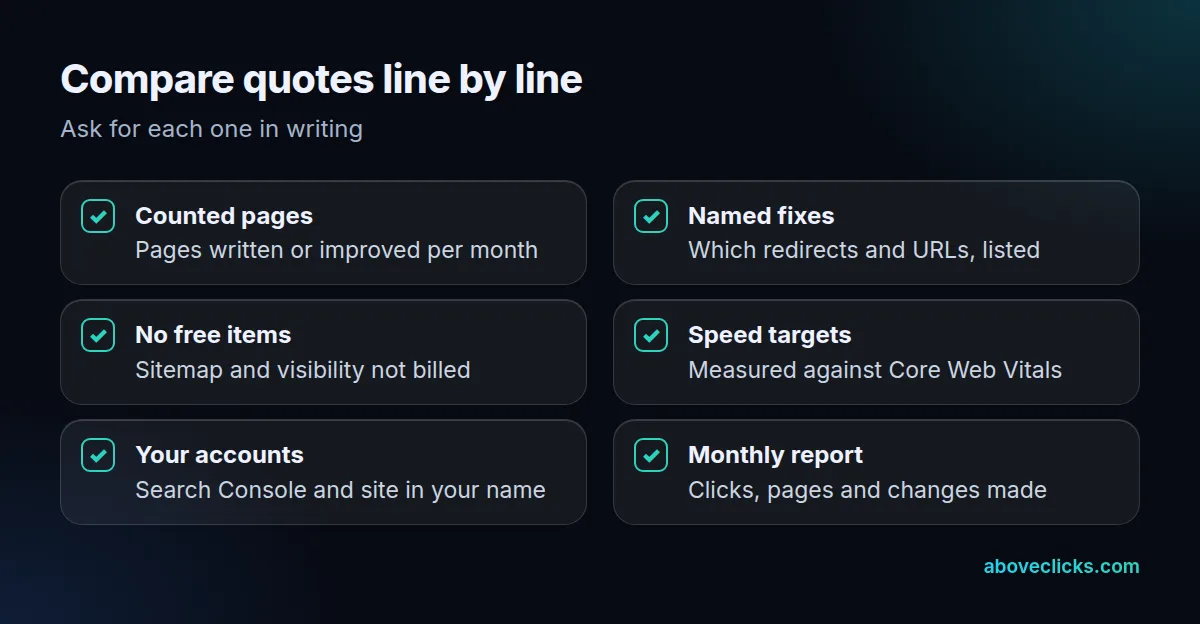
Take an invented example of 3 quotes for WordPress SEO packages. Quote A lists a sitemap and a visibility check as monthly deliverables. Quote B lists 4 pages written and a list of redirects. Quote C lists only “ongoing optimization”. Quote A charges for work WordPress does for free, and quote C cannot be checked at all. Quote B is the only one you can hold to account at the end of the month.
Account ownership is the last check. Keep your WordPress admin and Search Console in your own name and add the provider as a user, so that the data stays with you if the plan ends. We prefer to start with a look before a sale. Our free audit is a written review of your site, and the sample report shows the layout. If your site needs a rebuild rather than a fix, see our WordPress development service, and for more comparisons browse the buying guides.