A web pixel is JavaScript that Shopify runs in a sandbox on a store's pages to collect customer events, such as page views, add-to-carts and completed checkouts, and send them to analytics or ad platforms. Apps install app pixels; merchants add custom pixels by hand under Customer events.
A web pixel is JavaScript that Shopify runs in a sandbox on a store’s pages to collect customer events, such as page views, add-to-carts and completed checkouts, and send them to analytics or ad platforms. Apps install app pixels; merchants add custom pixels by hand under Customer events.
Who adds a pixel, and where does it run?
An app adds one when you install it, and it runs in a strict sandbox, a web worker. A merchant adds the other kind by pasting code, and it runs in a lax sandbox, an iframe.
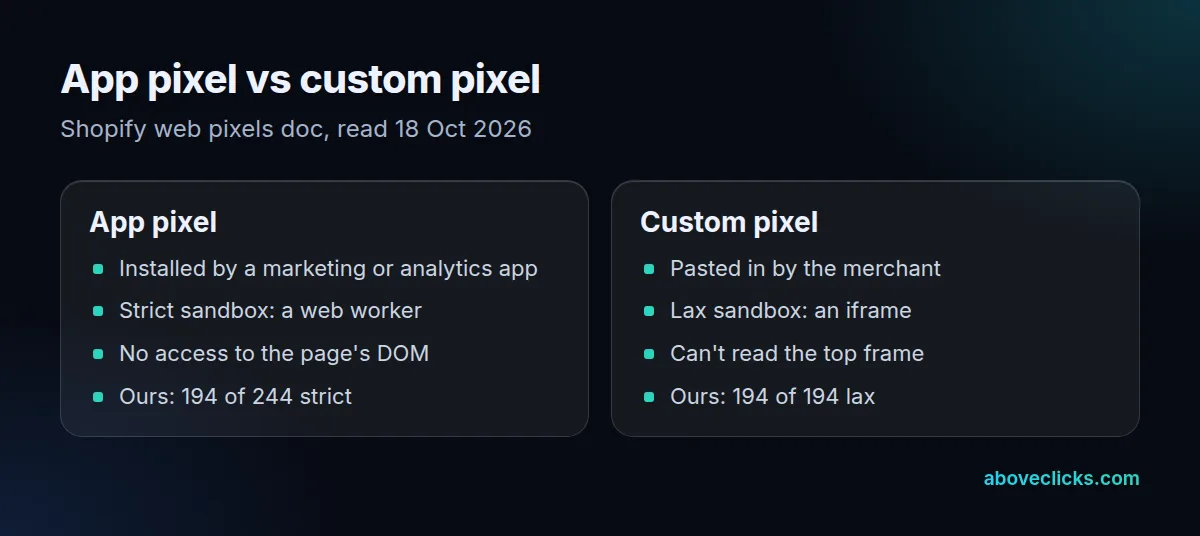
Shopify’s web pixels doc explains the trade-off. The strict sandbox promises only a short list of globals, such as self, console, setTimeout and fetch, and every request must support CORS. Old tags that read window.document won’t work there. The lax iframe carries the allow-scripts and allow-forms sandbox values, so legacy JavaScript runs, but it can’t reach the top frame; even window.href returns the sandbox URL. That’s why a Meta pixel pasted in by hand can lose features that scrape forms for emails or phone numbers.
Shopify’s advice to developers is to ship an app rather than ask merchants to paste code. The stores we read use both routes heavily. Of 438 connected pixels, 244 came from apps and 194 were pasted in, and all 194 hand-added ones ran lax. The app ones split 194 strict, 34 open and 16 lax. Each web pixel gets its own sandbox, so a crash in one doesn’t take down the others.
What events can a web pixel track?
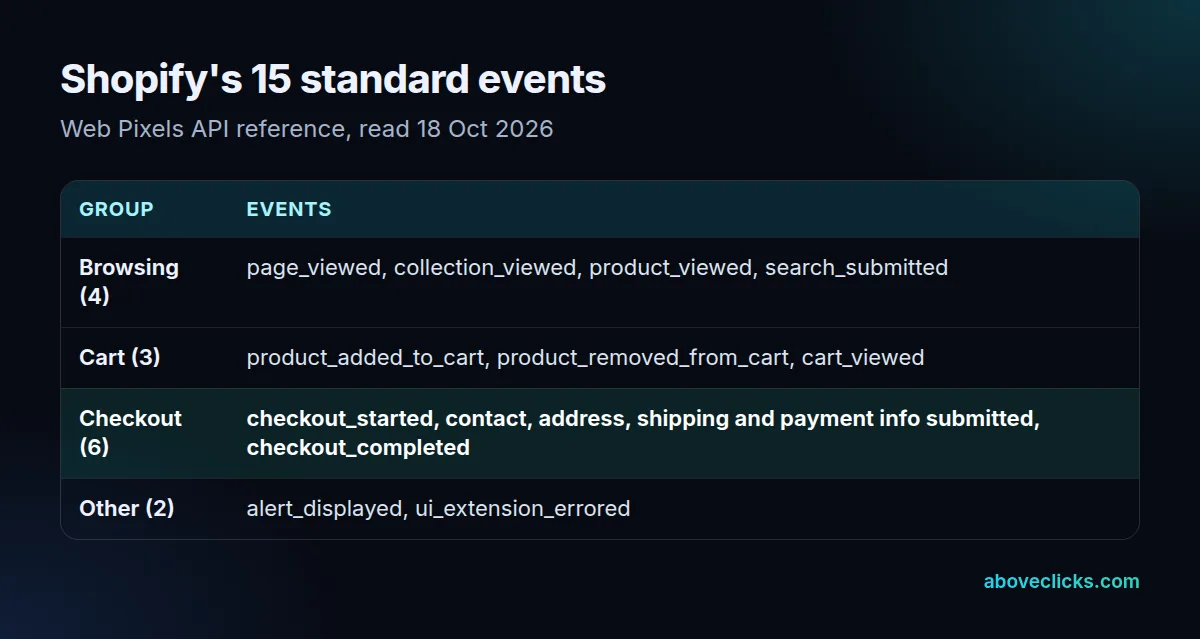
Shopify publishes 15 standard events, from page_viewed to checkout_completed, and each pixel subscribes to the ones it needs. DOM events, such as clicks and form submits, and custom events you publish yourself come on top.
Placement is the big change from the old checkout script box. The pixels overview says pixels load on 4 surfaces: the storefront, checkout, Thank you page and Order status page. On customer account pages they load only after you connect a custom subdomain for accounts.
Consent is built in too. Where shoppers must opt in, Shopify holds app callbacks until consent arrives, then replays the events already registered on the page, so the first page view isn’t lost. Pixels marked as data sale don’t run for shoppers who opted out of data sales, unless the pixel supports limited data use. Payload fields for each event are in the standard events reference.
438 pixels on 25 store homepages
On 18 October 2026 we read the pixel list Shopify prints into each homepage, the webPixelsConfigList, on 25 stores with Liquid themes. They had a median of 17 connected, from 6 at Snitch to 35 at Rothy’s.
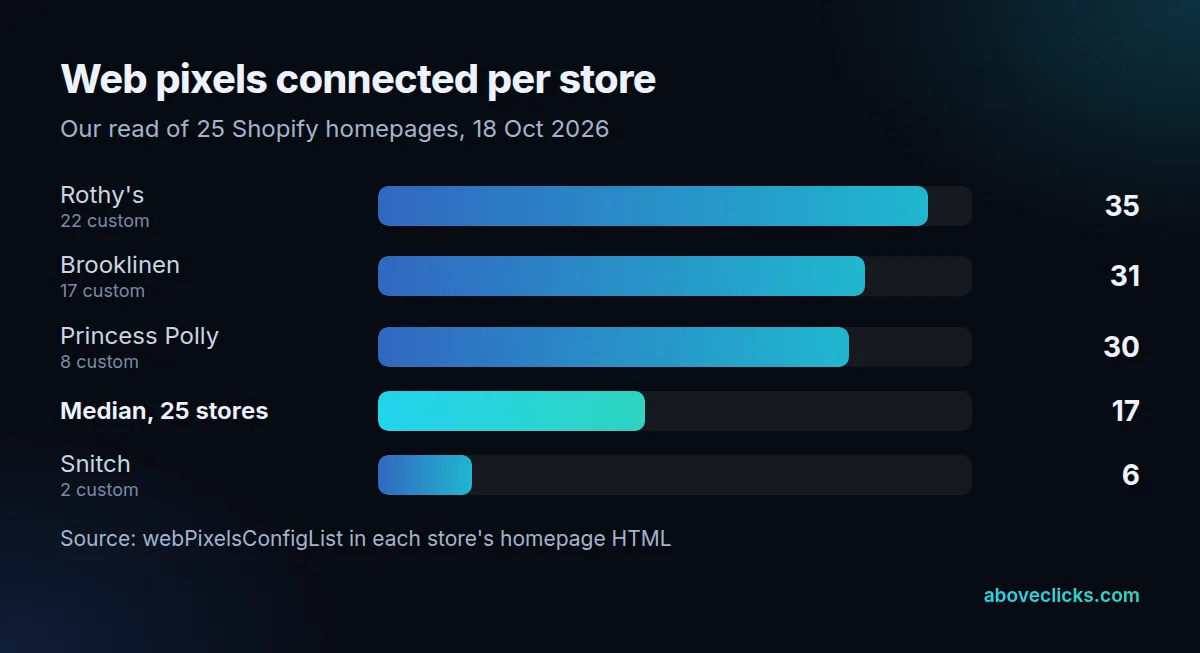
9 of the 25 had more hand-added pixels than app ones; Rothy’s had 22 against 13. Each one is another script, and Shopify’s own help is blunt: “The more scripts you have, the slower your store will run.” It adds that a broken script can run indefinitely and stop the site loading. Duplicates cost more than speed: a web pixel connected twice reports each purchase twice, which inflates conversions and misleads the ad platform’s bidding.
Example (a hypothetical candle store): its Customer events page lists 21 pixels, including 2 copies of the same TikTok tag and an affiliate tool it dropped last year. Removing the duplicates and dead tools leaves 12. Sending the purchase event through server-side tagging as well keeps ad platforms fed when a browser blocks a tag. Our checkout tracking service runs that audit, and our Shopify development team handles the theme side.