GA4 ecommerce events are the 14 recommended Google Analytics 4 events, such as view_item, add_to_cart, begin_checkout and purchase, that an online store sends with an items array. GA4 builds its product, checkout and revenue reports from them, so a missing or misnamed event leaves a gap.
Formulavalue = sum of (price × quantity) for every item, without shipping or tax
GA4 ecommerce events are the 14 recommended Google Analytics 4 events, such as view_item, add_to_cart, begin_checkout and purchase, that an online store sends with an items array. GA4 builds its product, checkout and revenue reports from them, so a missing or misnamed event leaves a gap.
What are the GA4 ecommerce events?
Google’s recommended events reference lists 14 GA4 ecommerce events under online sales. They follow a shopper from a product list to an order, plus promotions and refunds.
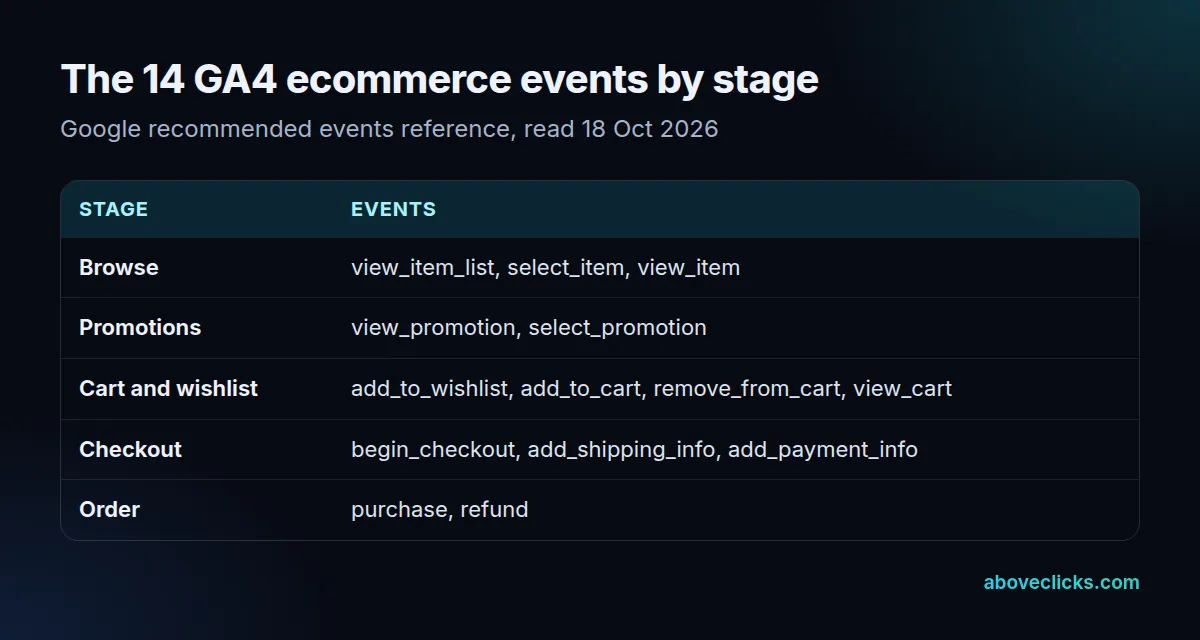
The names are fixed. Google’s ecommerce guide asks you to “follow the format in this document” so the data lands in the reports, and a home-made name such as addToCart is just a custom event to GA4. You don’t need all 14: a store without wishlists or on-site promotions can skip those 3 and still measure every step from view_item_list to purchase.
Which parameters does a GA4 purchase event need?
A GA4 purchase event needs a transaction_id, an items array, and a value with its currency. Each item in the items array needs at least an item_id or an item_name.
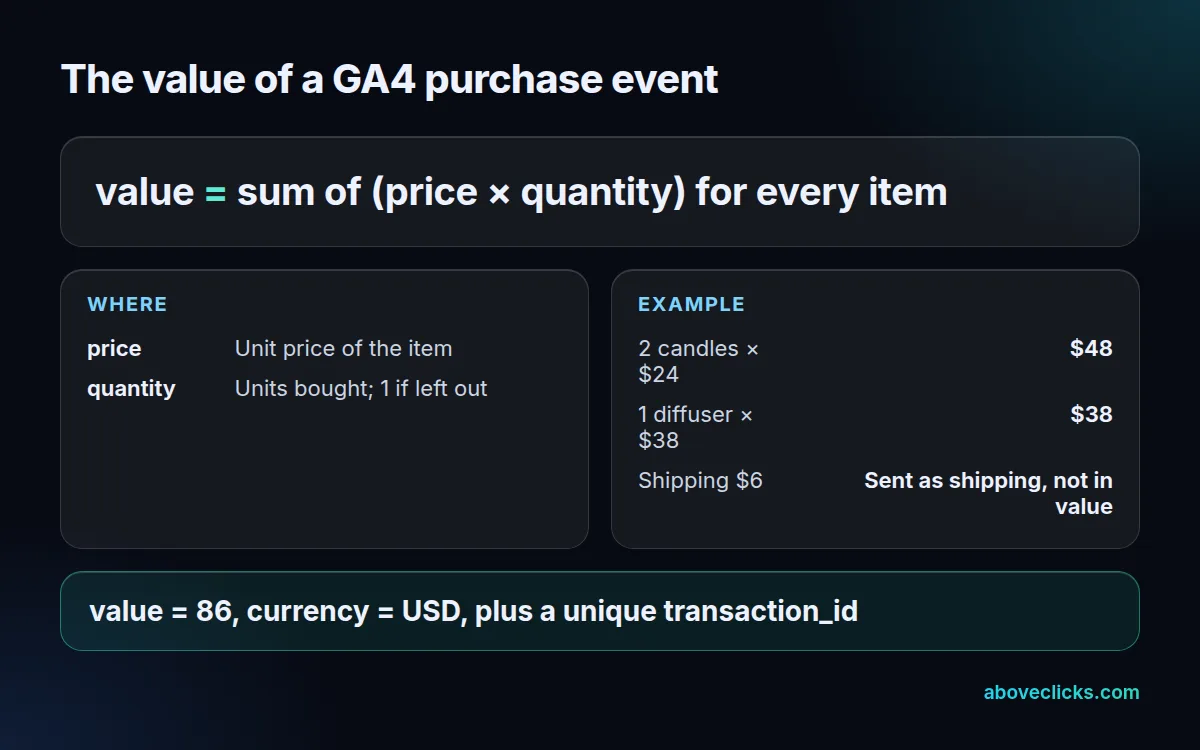
The value is the sum of price times quantity across the items, without shipping or tax, which have their own shipping and tax parameters. Example for a hypothetical candle store: 2 candles at $24 and 1 diffuser at $38 give a value of 86 in USD, and the $6 delivery charge goes in shipping. Quantity defaults to 1 when you leave it out, and the guide allows up to 27 custom parameters per item, such as scent or size, on top of the standard ones.
The transaction_id is your order number. Google says it “helps you avoid getting duplicate events for a purchase”, which matters when a thank-you page loads twice, for example after a reload.
Which GA4 ecommerce events do real stores send?
Cart and product-view events are near universal; promotions and refunds are rare. On 18 October 2026 we read the public Google Tag Manager containers loaded by 28 store homepages: 17 containers across 16 stores, since The Reformation runs 2.
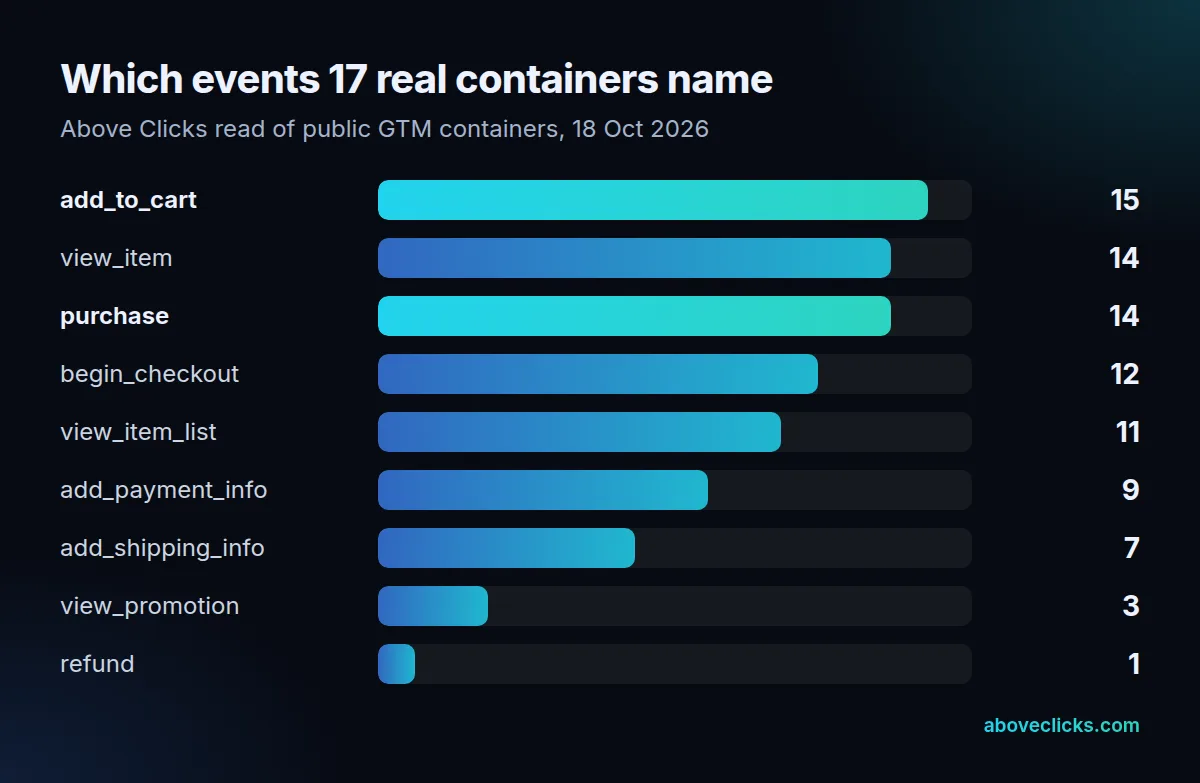
add_to_cart appeared in 15 of the 17 containers, view_item and purchase in 14 each, begin_checkout in 12. add_shipping_info showed up in 7, each promotion event in 3 and refund in just 1. No container named all 14 GA4 ecommerce events, 2 named none, and 12 of 17 referenced transaction_id.
A missing name isn’t proof of a gap: a store can send some events through an app or Shopify’s pixel settings instead, which a container read can’t see. A name being present doesn’t prove the event fires correctly either.
Checking your own setup
Turn on debug mode, which Google recommends “so you can see events in realtime and troubleshoot issues”, then place a test order. The GA4 purchase event should arrive once, with your order number as transaction_id and a value equal to the order’s items, before shipping and tax. For the example candle order that means 1 purchase event, a value of 86 and 2 entries in the items array, then the same order number again if you reload the page, with no second purchase counted. Our checkout tracking service runs that test on every step from product view to purchase, alongside your Google Analytics 4 property and Google Tag Manager container, and the tracking and analytics hub covers the rest.