Data driven attribution (Google writes data-driven attribution) is a Google Ads and GA4 attribution model that splits the credit for each conversion across the ads before it. It learns the split from your own account's converting and non-converting paths, not a fixed rule such as last click.
Data driven attribution (Google writes data-driven attribution) is a Google Ads and GA4 attribution model that splits the credit for each conversion across the ads before it. It learns the split from your own account’s converting and non-converting paths, not a fixed rule such as last click.
How does data driven attribution work?
It compares paths. Google’s Analytics Help says the model weighs the chance of a conversion with each ad interaction against the chance without it, and turns those differences into credit.

Google’s own illustration: 4 ad exposures together give a 3% chance of a key event, and without exposure 4 the chance drops to 2%, “so we know that Ad Exposure #4 drives +50% key event probability.” The model repeats that for every interaction and also weighs time before the conversion, device type, the number and order of ad interactions, and creative type. Each model is specific to each advertiser and each key event, and conversions can be reattributed for up to 7 days afterwards.
How is it different from last click?
Last click gives 100% of a sale to the final ad or channel clicked; DDA can give most of it to an earlier one. The difference shows up on any path with more than 1 click.
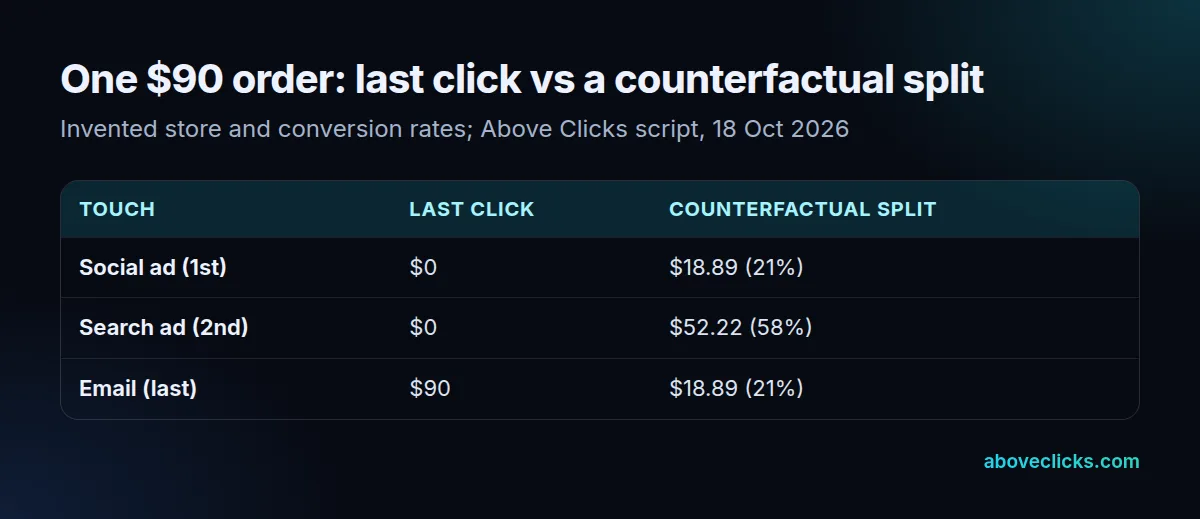
We worked the idea through in a short script for a hypothetical store. Its made-up conversion rates: 0.5% with no ads, 2.0% after a Search ad alone, 1.0% after a Social ad or an email alone, and 3.2% with all 3. For a $90 order on the path Social > Search > Email, last click hands email the full $90. A counterfactual split, the Shapley method, gives Search $52.22 (58%) and Social and Email $18.89 each, because Search lifts the conversion rate most. Google’s real DDA trains on your account’s paths, so its shares will differ; the direction of the shift is the point.
That shift feeds bidding. Bid strategies use the Conversions column, so Smart Bidding starts valuing the earlier campaigns more once DDA is on. Google has a page of best practices for switching that covers adjusting bids and targets after the change, because a campaign that gains credit can look cheaper per conversion overnight. Example: a Search campaign with $1,000 of spend and 20 last-click conversions shows a $50 cost per conversion; if DDA credits it with 25, that becomes $40 without a single extra sale.
How much data does DDA need?
None to switch it on, but more to be accurate. Google Ads makes every conversion action eligible “regardless of conversion or interaction volume”, and recommends at least 200 conversions and 2,000 ad interactions in supported networks within a 30-day period.

Below that, the model has little to learn from, and Google notes that the 2 models can produce the same results depending on data. Example: hypothetical Store A with 340 monthly conversions clears the guideline; Store B with 60 doesn’t, and its DDA reports may look just like last click. DDA covers Search (including Shopping), YouTube, Display and Demand Gen, and it’s the default for most conversion actions. For the wider choice, see attribution model. Our GA4 audit checks which model each conversion uses, and the tracking and analytics hub covers the rest.