A conversion window is the period after someone clicks or views an ad during which a conversion, such as a purchase, still gets credited to that ad. A sale that lands after the window closes isn't recorded for the ad at all, so the setting changes your reported results.
A conversion window is the period after someone clicks or views an ad during which a conversion, such as a purchase, still gets credited to that ad. A sale that lands after the window closes isn’t recorded for the ad at all, so the setting changes your reported results.
What are the default windows in Google Ads?
30 days after a click, 3 days after an engaged video view and 1 day after a view, unless you change them. Each conversion action has its own windows, set when you create it or later.

Google’s conversion windows page allows anywhere from 1 to 90 days for clicks, depending on the conversion source, and recommends at least 7 days because they “provide a richer set of conversion data.” GA4 calls the same idea a lookback window: its attribution settings default to 30 days for acquisition key events (first_open and first_visit) and 90 days for every other key event. That gap alone is one reason Google Ads and GA4 rarely report the same totals.
What is a view-through or engaged-view window?
They cover ads people saw but didn’t click. A view-through conversion counts a sale after an ad impression, by default within 1 day; an engaged-view conversion counts one after a video engagement, by default within 3 days.
Both are a conversion window, just a short one on purpose, because seeing an ad is weaker evidence than clicking it. Lengthening them credits more sales to display and video ads, and the attribution model then decides how that credit is shared among the ads in the path.
How long should the conversion window be?
As long as your customers usually take to buy, which the time lag report in Google Ads attribution reports shows. Google’s own example: if 75% of conversions happen between day 25 and day 30 after an interaction, set the window to at least that.
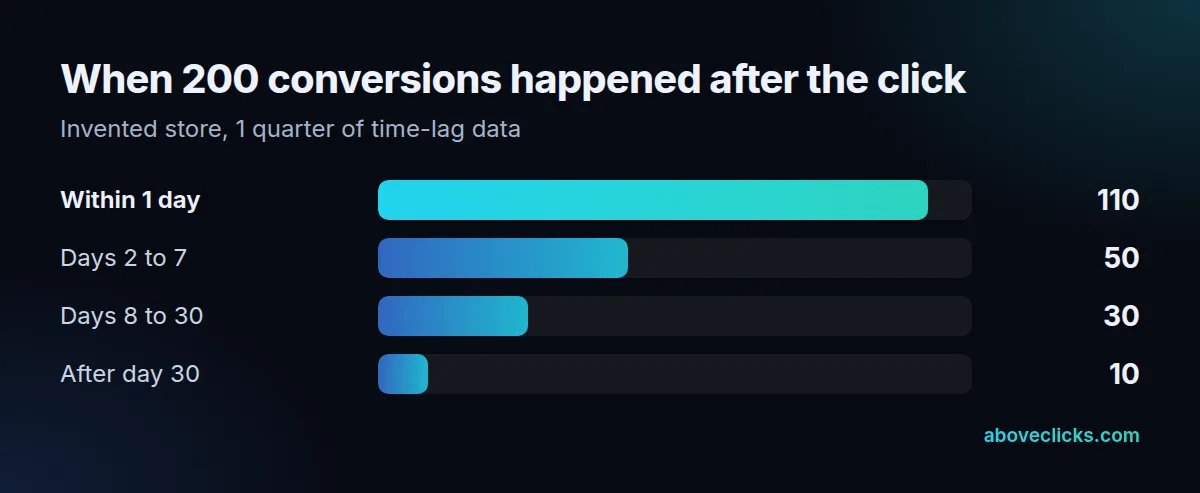
Example for a hypothetical store with 200 conversions in a quarter: 110 happened within 1 day of the click, 50 on days 2 to 7, 30 on days 8 to 30 and 10 after that. A 7-day window would record 160 (80%), the 30-day default 190 (95%). For a store selling $40 skincare, the default is fine; for $2,000 furniture with a 3-week decision, a 60-day or 90-day window may fit better.
Bear in mind that a longer conversion window also delays when you can trust a week’s numbers: with a 30-day window, last week’s results keep rising for up to a month as late conversions arrive, so compare weeks only once their window has closed. Smart Bidding learns from the same counts, so a window that’s too short teaches it that slower buyers never convert.
Changing it later
Conversion window changes only apply from that day forward, and past conversions are never recounted. Google’s example walks 1 ad interaction from a 30-day window to 10 days and then 20 days:

So decide the conversion window before you compare periods, and note the date in your reporting. If your GA4 conversions are imported into Google Ads under paid and organic channels, the window has to be changed in GA4, not Google Ads. Our GA4 audit lines up windows and models between Google Analytics 4 and your ad accounts, and the tracking and analytics hub covers the rest.