Cart abandonment rate is the share of shopping sessions where a visitor added an item to the cart but didn't buy, shown as a percentage. The usual formula is 1 minus sessions that completed checkout divided by sessions with cart additions, so a lower number is better.
FormulaCart abandonment rate = 1 − sessions that completed checkout ÷ sessions with cart additions
Cart abandonment rate is the share of shopping sessions where a visitor added an item to the cart but didn’t buy, shown as a percentage. The usual formula is 1 minus sessions that completed checkout divided by sessions with cart additions, so a lower number is better.
How do you calculate cart abandonment rate?
Divide sessions that completed checkout by sessions with cart additions, then subtract the result from 1. For a hypothetical home-fragrance store: 1 − 690 ÷ 2,250 = 69.3%.
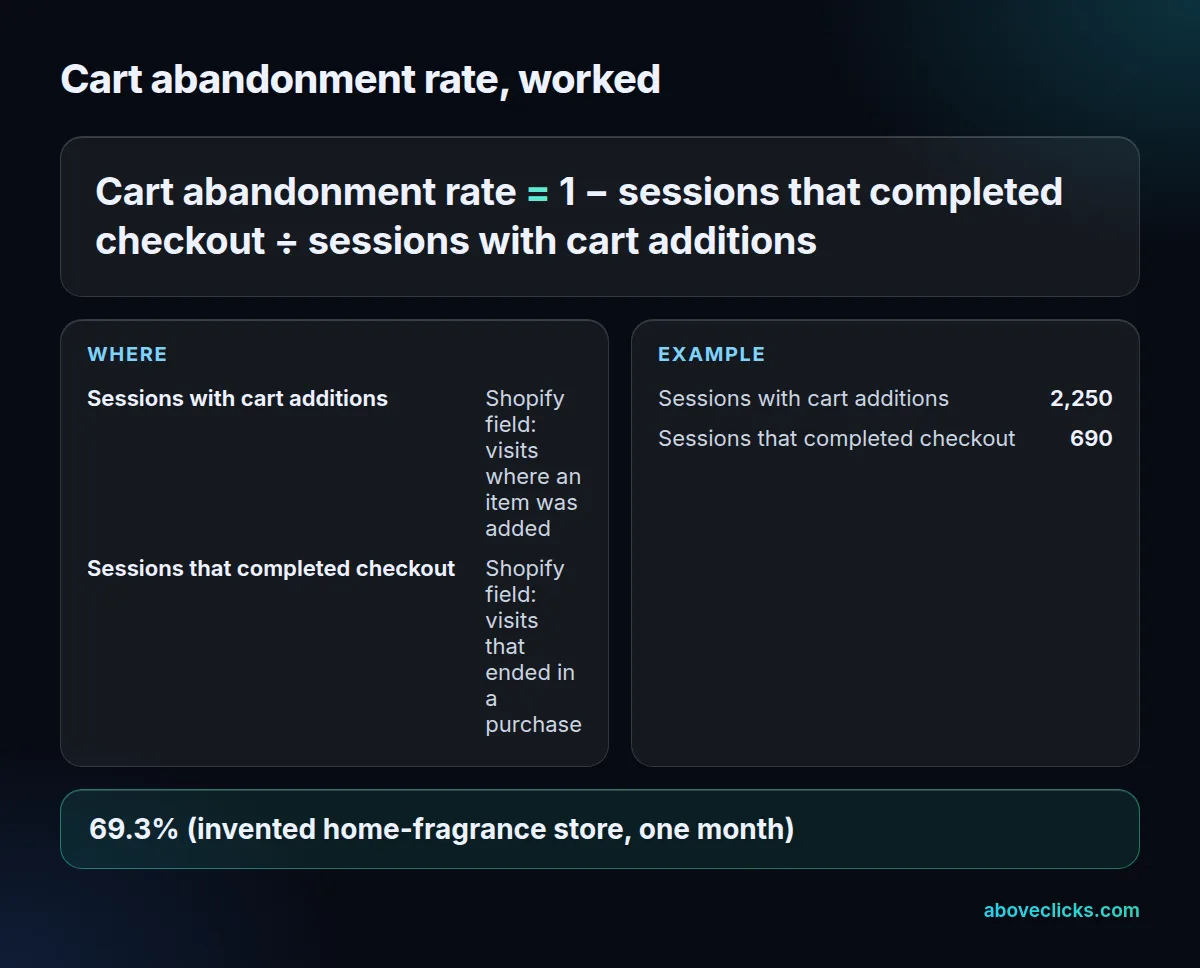
Shopify doesn’t show this as one number, but both inputs are fields in its analytics fields reference: “Sessions with cart additions” and “Sessions that completed checkout”. The same store had 30,000 sessions that month, so its added to cart rate, which Shopify defines as sessions with cart additions divided by sessions, was 7.5%. Read the two together: a falling cart abandonment rate with a falling add to cart rate can just mean fewer casual adds.
Why do Shopify and GA4 give different numbers?
Shopify counts sessions, GA4 counts events. A shopper who adds 3 items sends 3 add_to_cart events, so the event-based rate reads higher: 79.4% for the same hypothetical month.
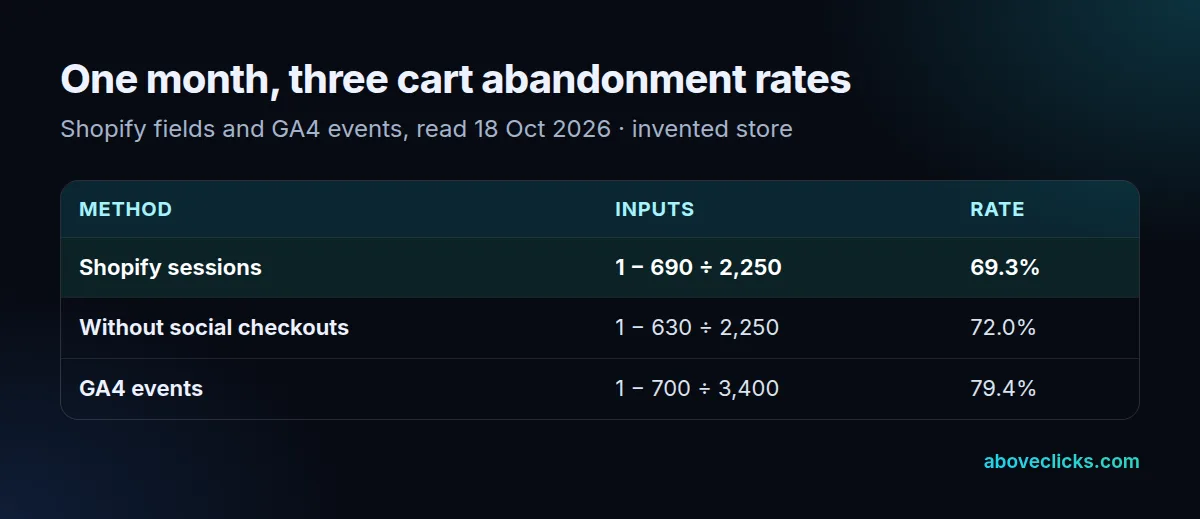
GA4’s ecommerce guide has add_to_cart and purchase as separate ecommerce events. Our store logged 3,400 add_to_cart events and 700 purchase events, so 1 − 700 ÷ 3,400 gives 79.4%, 10 points above the session figure. Neither is wrong; they answer different questions. Pick one cart abandonment rate method and keep it, or every abandoned cart email report will disagree with your dashboard.
What is a good cart abandonment rate?
Neither Shopify nor Google publishes a target. Compare your rate with your own earlier months, measured the same way, and split it by device and channel.
A change in how sessions are counted moves the rate with no change in shoppers. As of October 2026, the recent one is Shopify’s session measurement update, rolled out from 21 to 23 September 2026. It filters identified bot sessions by default and lists add to cart rate among the affected metrics, so treat months before and after it as different series. The same applies when you add a quick-buy button: more purchases skip the cart, which lowers the rate without any change in behavior. Read it next to conversion rate, which uses all sessions.
Splitting the cart abandonment rate is where it becomes useful. Say our hypothetical store’s 69.3% breaks down into 74% on mobile and 58% on desktop. That 16-point gap points at the phone experience: shipping costs shown late, a slow cart drawer, or a login wall. A gap by channel tells a different story: a high rate on one paid channel may say more about the ad and its audience than about the store.
Checking your tracking
Your tracking needs to record both ends. On 18 October 2026 we read 17 public Google Tag Manager containers from real store sites: 14 name both add_to_cart and purchase.
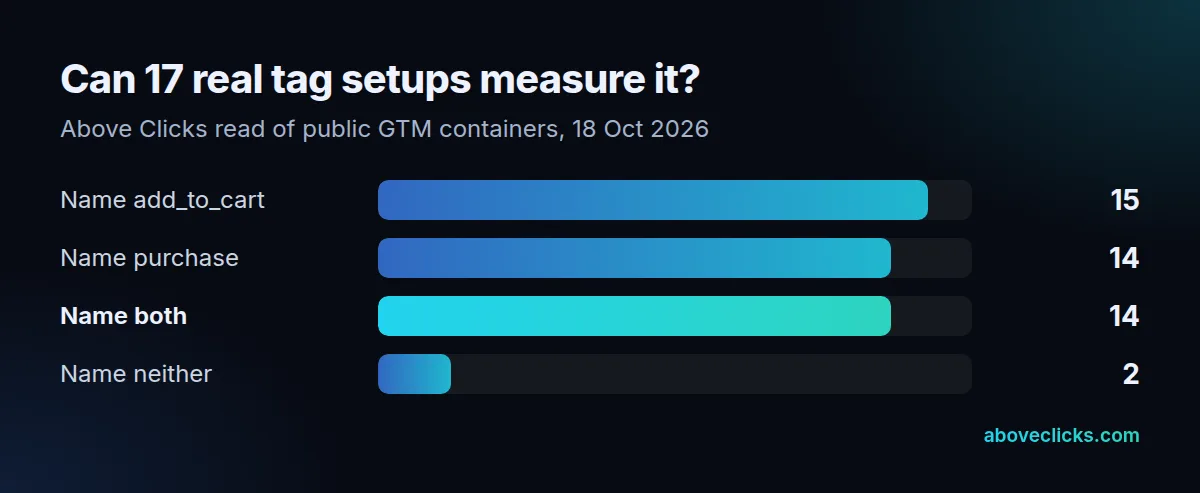
Rothy’s container names add_to_cart and begin_checkout but not purchase, and 2 containers name no ecommerce event at all, so neither could compute the rate from GTM data alone. Shopify adds one more trap: “Checkouts can exceed add-to-cart counts when customers purchase directly from channels such as Instagram Shopping or Facebook Shops without visiting your cart page.” In our worked month, 60 of 690 purchase sessions came that way. Leave them out and the cart-only cart abandonment rate is 72%.
To test your own setup, add an item to the cart on your live site with your browser’s developer tools open and confirm an add_to_cart hit fires once, not twice. Then place a test order and confirm a single purchase hit with the order ID. Our conversion rate optimization service checks both events before it reports this number.