How to use the UTM builder
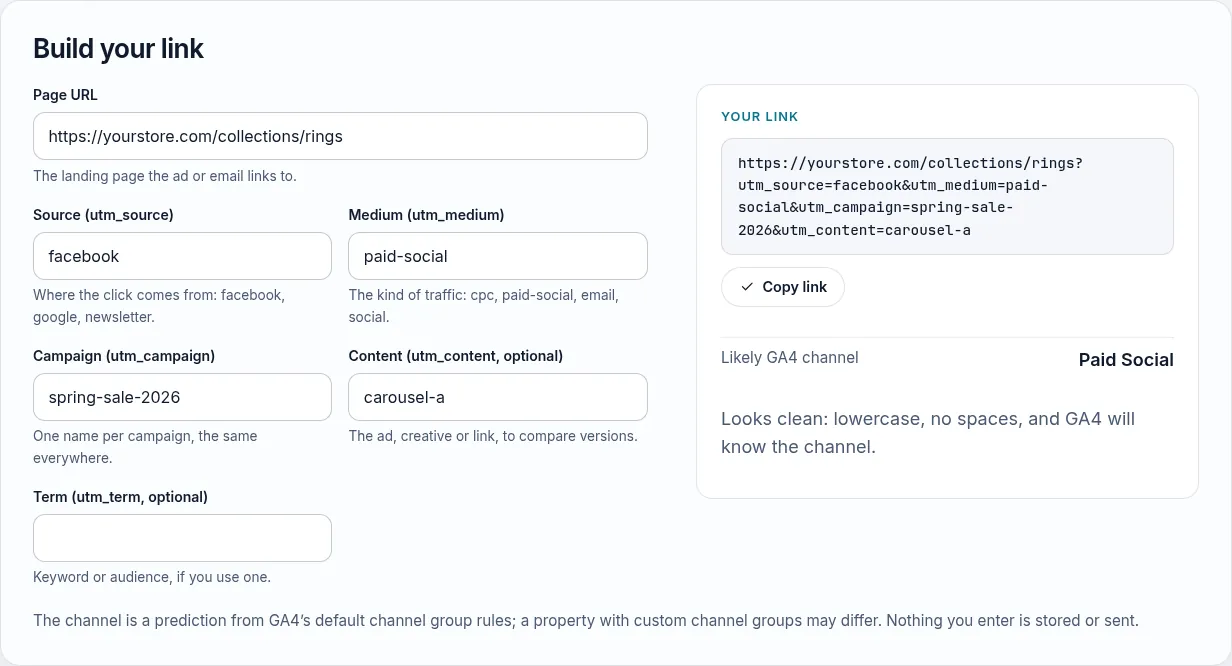
The UTM builder needs a page URL and three UTM parameters; two more are optional.
- Page URL: the landing page the ad or email links to.
- Source (utm_source): where the click comes from, such as facebook, google or newsletter.
- Medium (utm_medium): the kind of traffic, such as cpc, paid-social, email or social.
- Campaign (utm_campaign): one name per campaign, written the same way in every channel.
- Content and term (optional): the ad or link variant, and the keyword.
- Copy the link: it comes out lowercased and cleaned, with the GA4 channel it will likely land in.
Under the link come three fixes to start with. For the example they are: keep a naming sheet, name the ad in utm_content, and check GA4 after the first clicks.

On a phone, the finished link and its channel sit under the fields, ready to copy.

Google documents the five parameters on its URL builders help page, and the rules that sort traffic into channels on its default channel group page; the channel preview follows those rules. Before you rely on the reports, run the tracking health check.
Why UTM naming matters
UTM parameters tell GA4 where a visit came from. GA4 records them exactly as written, so “Facebook”, “facebook” and “fb” become three different sources, and a medium GA4 doesn’t recognize sends the visit to the Unassigned channel. A month later nobody can tell which campaign paid off.
This builder cleans every value as you type (lowercase, hyphens instead of spaces, no special characters) and predicts which default GA4 channel the visit will land in, so you can fix the link before it goes live.
The five parameters
- utm_source: where the click comes from (facebook, google, newsletter). Required.
- utm_medium: the kind of traffic (cpc, paid-social, email, social). Required. This drives the GA4 channel more than anything else.
- utm_campaign: the campaign name, the same everywhere it runs (spring-sale-2026).
- utm_content: the ad, creative or link, to compare versions inside one campaign.
- utm_term: the keyword or audience, if you use one.
A naming convention that works
- Lowercase only, words separated by hyphens.
- One fixed list of sources and mediums, written down where the whole team can see it.
- Paid traffic gets a paid medium:
cpcfor search ads,paid-socialfor social ads. GA4 treats a medium as paid if it contains “cp” (cpc, cpm), is “ppc” or “retargeting”, or starts with “paid”. - Campaign names in a fixed order, for example
offer-audience-month. - Never put UTMs on links between pages of your own site: they start a new session and overwrite the real source.
Google Ads: use auto-tagging
For Google Ads, turn on auto-tagging instead of adding UTMs by hand. Google then adds a gclid to each click, and GA4 receives the campaign, ad group and keyword automatically. The builder warns you when it sees google with a paid medium.
How the channel prediction works
GA4 sorts sessions into default channel groups using rules on source and medium: for example, a social source with a paid medium is Paid Social, while the same source with medium “social” is Organic Social. The builder applies a simplified copy of those rules with shortened source lists. If your GA4 property uses custom channel groups, your reports may differ.
A day after launch, check Reports → Acquisition → Traffic acquisition and confirm the visits show where you expected. If your numbers still don’t add up, the tracking health check covers the rest of the setup.