n8n is a workflow automation tool you can run on your own server or use as n8n's cloud service. A workflow starts from a trigger, such as a new Shopify order, and chains app nodes, code and AI steps, with usage counted per full workflow run rather than per step.
n8n is a workflow automation tool you can run on your own server or use as n8n’s cloud service. A workflow starts from a trigger, such as a new Shopify order, and chains app nodes, code and AI steps, with usage counted per full workflow run rather than per step.
What is n8n used for?
Connecting apps and automating the work between them: syncing orders to a sheet or ERP, routing leads, answering support emails with an AI step, or running scheduled checks. Developers like it because any step can be custom code.
The official docs describe it in one line: “n8n is a fair-code licensed workflow automation tool that combines AI features with business process automation.” Fair-code means the source is public on GitHub, but the licence limits how you may use it. Workflows can start from a webhook, a schedule, a form or an app event, and any step can call an API directly.
Usage is counted per run, not per step. As of October 2026, the n8n pricing guide puts a daily schedule at 30 or 31 executions a month and a schedule every 5 minutes at about 8,600 to 8,900.
Is the self-hosted edition free to use?
The self-hosted Community edition is free, under a licence that allows use for your own internal business purposes or non-commercial and personal use. The n8n cloud plans are paid and priced by workflow executions.
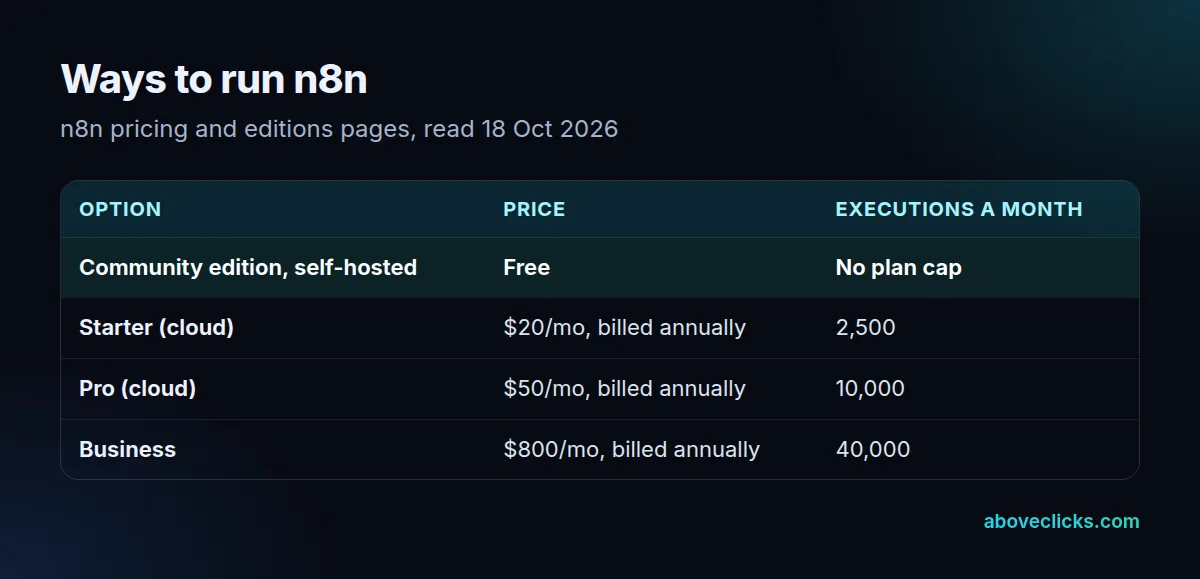
As of October 2026, the pricing page lists Starter at $20 a month billed annually for 2,500 executions, Pro at $50 for 10,000 and Business at $800 for 40,000, each with unlimited steps per execution. The Community edition is what the software runs as without a licence key. The LICENSE.md adds that you may distribute it to others only free of charge for non-commercial purposes. Self-hosting isn’t free of cost, though: you pay for the server and own the updates, backups and security.
How does it work with Shopify?
Through a Shopify Trigger node that subscribes to store webhooks and a Shopify node that reads and writes store data. Any other Shopify call can go through a plain HTTP request step.
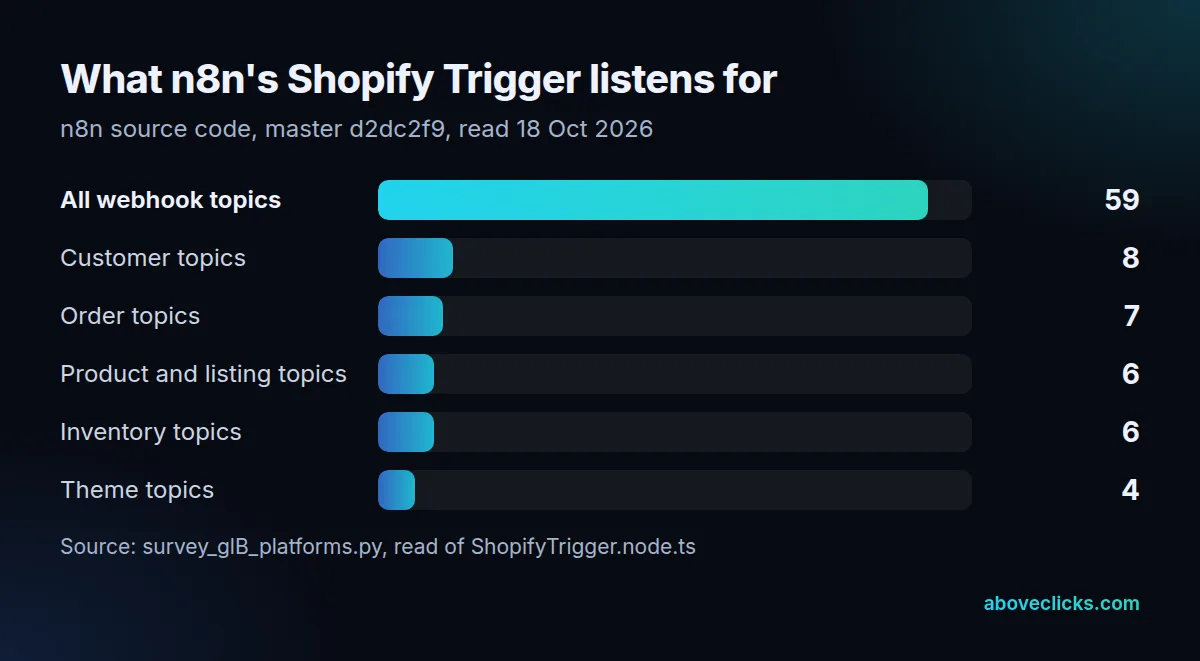
On 18 October 2026 we read the n8n source code for these nodes. The trigger offers 59 webhook topics, 7 of them for orders. The request helper still builds Admin API calls on the REST path that Shopify calls legacy, pinned to version 2024-07. Shopify no longer serves that version, and its versioning page says such calls are answered by the oldest supported version instead, so the node’s behaviour can shift each quarter without anyone changing a workflow.
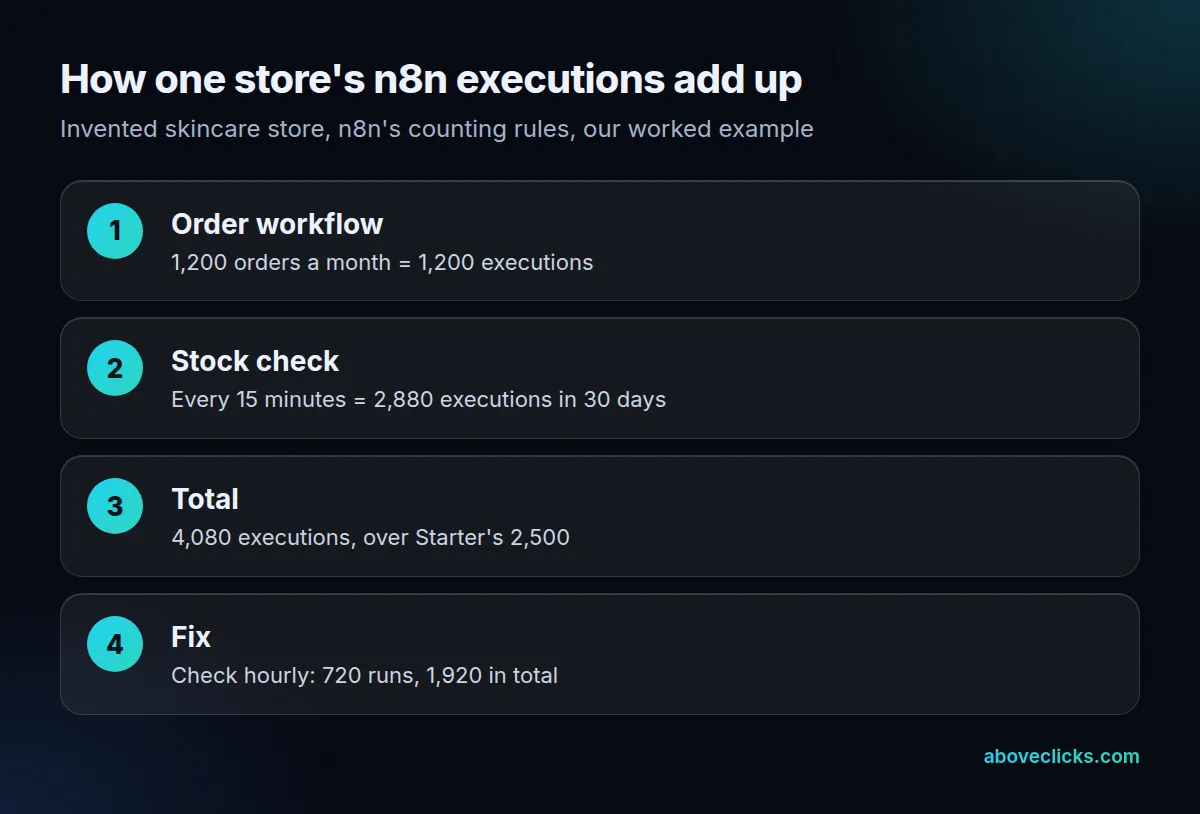
Example (a hypothetical skincare store): an order workflow runs 1,200 times a month, and a stock check runs every 15 minutes, 2,880 times in 30 days. That’s 4,080 n8n executions, over Starter’s 2,500, while an hourly check cuts the total to 1,920. Schedules are often the biggest line in an execution budget, so set them no tighter than the job needs.
Our business automation team builds and hosts n8n workflows, and uses the HTTP request step on current API versions where a built-in node lags behind.