DKIM (DomainKeys Identified Mail) is an email authentication method in which the sending server adds a cryptographic signature to each message, and the receiving server checks it with a public key the sender publishes in DNS. A valid signature proves the signed headers and body weren't changed after sending.
DKIM (DomainKeys Identified Mail) is an email authentication method in which the sending server adds a cryptographic signature to each message, and the receiving server checks it with a public key the sender publishes in DNS. A valid signature proves the signed headers and body weren’t changed after sending.
What is a DKIM selector?
It’s the name of one key, so a domain can publish several. The receiver finds the key at selector._domainkey.yourdomain, using the s= value in the signature. RFC 6376 introduced selectors “to support multiple concurrent public keys per signing domain”.
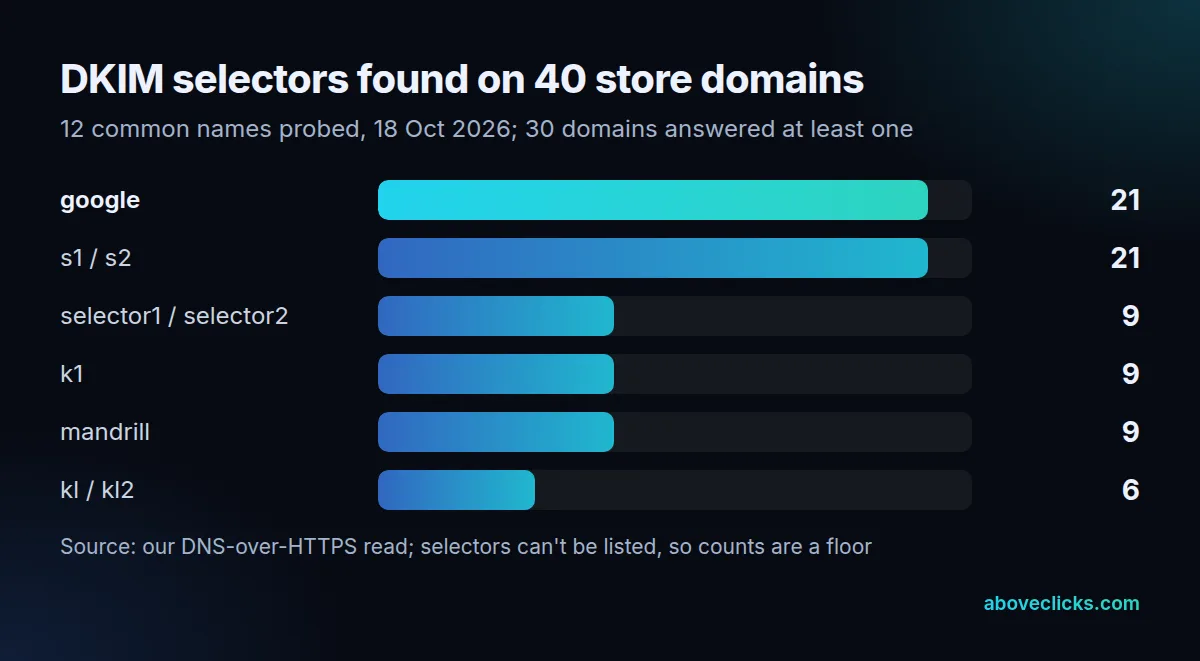
In practice each sending service gets its own. On 18 October 2026 we probed 12 common selector names on 40 store domains and got an answer on 30. google, the default in Google Workspace, showed up on 21; s1 and s2 on 21 as well. Selectors can’t be listed from outside, so a store with no hit may still sign with a name we didn’t try.
What does a DKIM record look like?
A TXT record named selector._domainkey with the value v=DKIM1; k=rsa; p= followed by the public key. Google’s DKIM setup help uses google._domainkey as its example name.
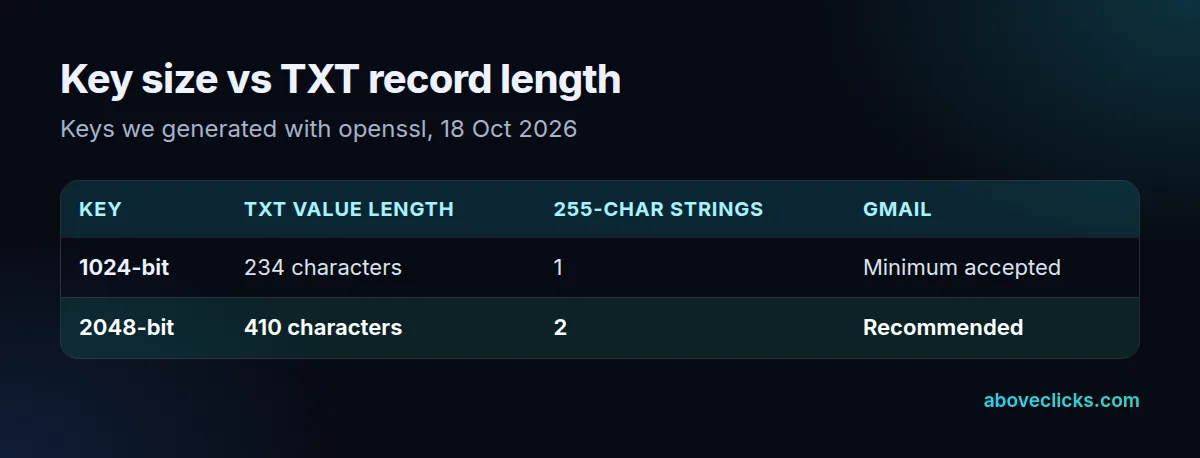
Key size changes the record. The RFC says “Signers MUST use RSA keys of at least 1024 bits”, and Google’s sender guidelines require 1024 bits for personal Gmail accounts and recommend 2048. When we generated both, the 1024-bit value was 234 characters and the 2048-bit one 410. A single DNS text string holds 255, so the longer key must be split into 2 strings, and some domain hosts’ forms can’t do that. After you publish it, Google notes “it can take up to 48 hours for DKIM authentication to start working”.
What does the signature protect?
The body and every header named in the signature’s h= tag, nothing else. We tested this on a hypothetical store’s newsletter, signed with a 2048-bit key and relaxed canonicalization.
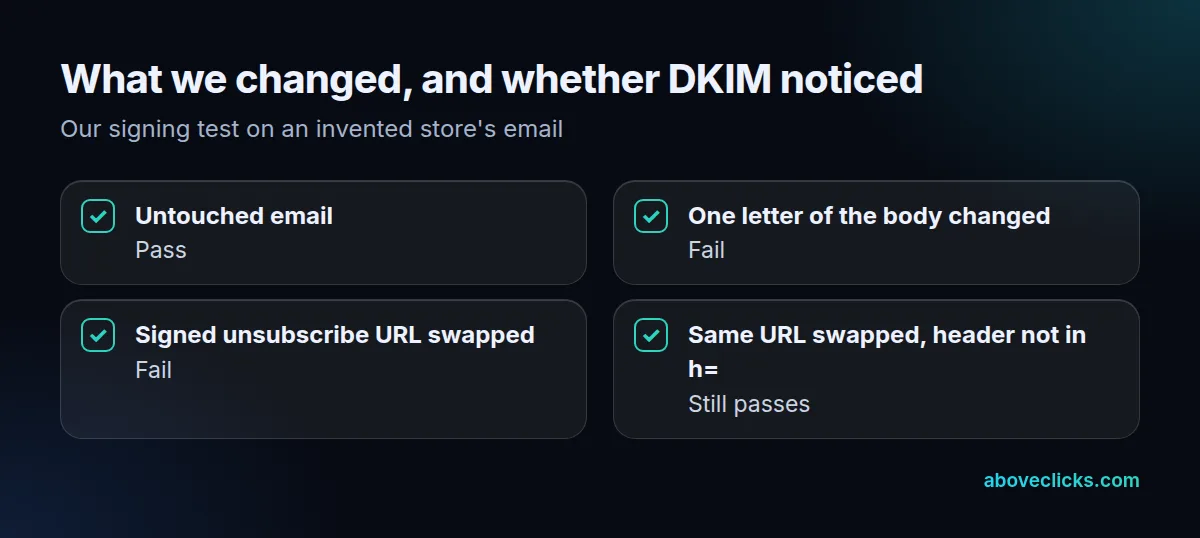
The untouched email verified. Changing 1 character in the body, “linen” to “Linen”, broke it. So did swapping the List-Unsubscribe URL for another domain’s, because that header was in h=. Then we signed the same email without the unsubscribe headers in h= and swapped the URL again: the signature still passed. That’s why one-click unsubscribe requires both of its headers to be signed.
Two settings decide how strict the check is. Canonicalization comes in a simple form that tolerates almost no change and a relaxed one that forgives whitespace and header-case edits made in transit; most senders pick relaxed for both parts. The optional l= tag signs only the first part of the body, and RFC 6376 warns: “A body length count of zero means that the body is completely unsigned.” Leave l= out. The From header itself must always be in h=.
How it works with SPF and DMARC
DKIM proves the message is intact and names a signing domain; the SPF record lists allowed servers; DMARC checks that one of the 2 matches the From address and says what to do if neither does. Google requires all 3 from senders of more than 5,000 messages a day to Gmail. A forwarded message usually breaks SPF but keeps a valid DKIM signature, which is why DKIM tends to be the check that carries DMARC for newsletters. Our email broadcasting service sets up a 2048-bit key per sending tool.